

-1.png?width=400&height=386&name=Group%2026%20(1)-1.png)

HubSpot account-based marketing (ABM) is a strategy that uses HubSpot’s CRM, workflows, and reporting tools to target high-value B2B accounts with personalized campaigns, account scoring, and multi-channel engagement.
Most ABM programs fail because they operate like campaigns instead of systems. In HubSpot, ABM works when it becomes an always-on revenue engine built around prioritization, timing, and real buying signals.
What is Account-Based Marketing in HubSpot?
Account-based marketing in HubSpot aligns sales and marketing to target specific companies instead of individual leads. Using HubSpot ABM tools, teams can track engagement at the account level, automate outreach, and measure revenue impact.
- Company-level targeting
- Buying committee tracking
- Workflow automation
- Campaign personalization
- Revenue attribution
This makes ABM for B2B in HubSpot one of the most effective ways to drive pipeline.
HubSpot ABM Strategy: How to Build a High-Performing Program
A strong HubSpot ABM strategy focuses on precision, not volume. Instead of targeting hundreds of accounts, high-performing teams prioritize based on fit, intent, and timing.
The best ABM HubSpot strategy includes:
- Clear ICP definition
- Tiered account segmentation
- Account-level scoring
- Sales and marketing alignment
Insight: If your HubSpot account-based marketing strategy doesn’t dynamically prioritize accounts, it won’t scale.
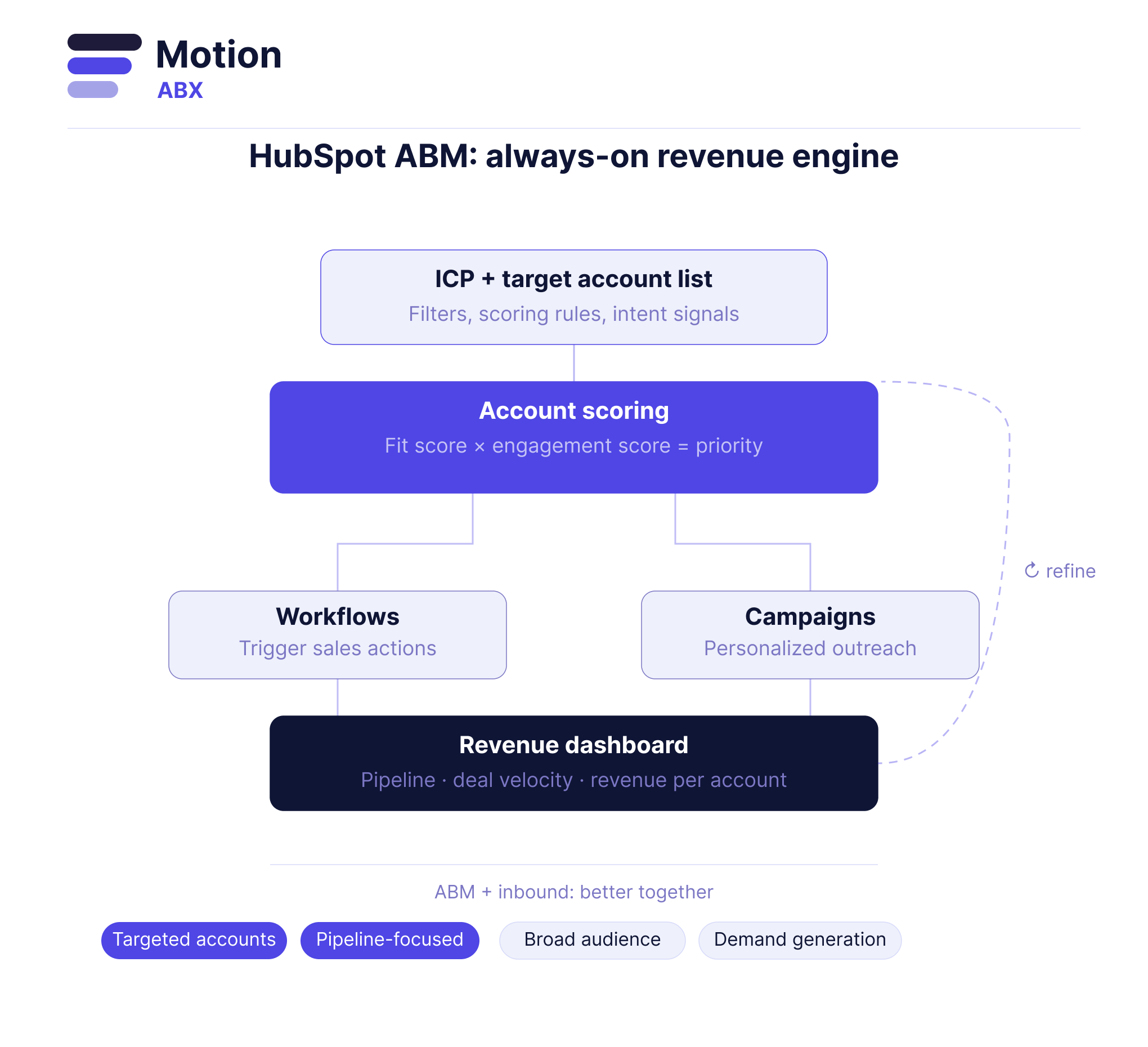 HubSpot ABM Setup: Step-by-Step Implementation
Setting up ABM in HubSpot requires more than creating lists — it requires building a system.
1. Define ICP as a Scoring Model
Turn your ICP into filters, scoring rules, and segmentation logic.
2. Build a Target Account List
Use CRM data, intent signals, and historical deals to create a high-quality list.
3. Map the Buying Committee
Associate multiple contacts to each account and track engagement across roles.
4. Create Account Scoring
Use fit score and engagement score to prioritize accounts.
Account Priority = Fit × Engagement
5. Build Workflows
Effective HubSpot ABM setup includes workflows that trigger sales actions, not just emails.
6. Launch Campaigns
Coordinate outreach across channels using HubSpot ABM features.
7. Track Performance
Measure pipeline, revenue, and engagement at the account level.
HubSpot ABM Tools and Features
To execute effectively, you need to leverage the full set of HubSpot ABM tools and HubSpot ABM features.
- Target accounts dashboard
- Workflows automation
- Lists and segmentation
- Personalization tokens
- Campaign tracking
These account-based marketing HubSpot tools allow teams to manage complex ABM programs inside one platform.
HubSpot ABM Dashboard and Reporting
The HubSpot ABM dashboard is where strategy turns into insight.
Strong HubSpot ABM reporting should track:
- Account engagement
- Pipeline per account
- Revenue per account
- Deal velocity
Insight: The best HubSpot ABM dashboards focus on revenue, not just activity.
HubSpot ABM vs Inbound Marketing
Comparing HubSpot ABM vs inbound marketing shows how the two approaches complement each other.
| ABM | Inbound |
|---|---|
| Targeted accounts | Broad audience |
| Personalized outreach | Content-driven |
| Sales + marketing aligned | Marketing-led |
| Pipeline-focused | Lead-focused |
The most effective strategy combines inbound for demand generation and HubSpot account-based marketing for conversion.
Common HubSpot ABM Mistakes
- Targeting too many accounts
- No account prioritization
- Using contact-level logic instead of account-level
- Not using HubSpot ABM reporting
Fix: Build a structured HubSpot ABM strategy with scoring, workflows, and dashboards.
Advanced HubSpot ABM Strategies in 2026
- AI-driven account scoring
- Predictive intent signals
- Real-time workflow triggers
- Automated sales plays
The future of ABM in HubSpot is continuous orchestration — not one-off campaigns.